


The short answer: Activation Lock is Apple’s anti-theft feature that ties an iPhone to one Apple Account, so nobody can wipe it and use it without that account’s password. When you remove an iPhone from iCloud while it is switched off or broken, Apple does not release it there and then. It shows you a date around 30 days away, there is no published way to bring that date forward, and in our experience the handset stays locked until it passes. The way in before then is not to wait: enter the Apple Account password, or the phone’s old passcode, at the setup screen.
What that removal date actually means
This is a real iPhone 15 Pro on our own bench, photographed in iCloud Find Devices. It had come in dead, which is why it reads Offline and No location found. The owner had done the sensible thing and removed it from their account before sending it in. Apple’s answer was a date nearly a month out.
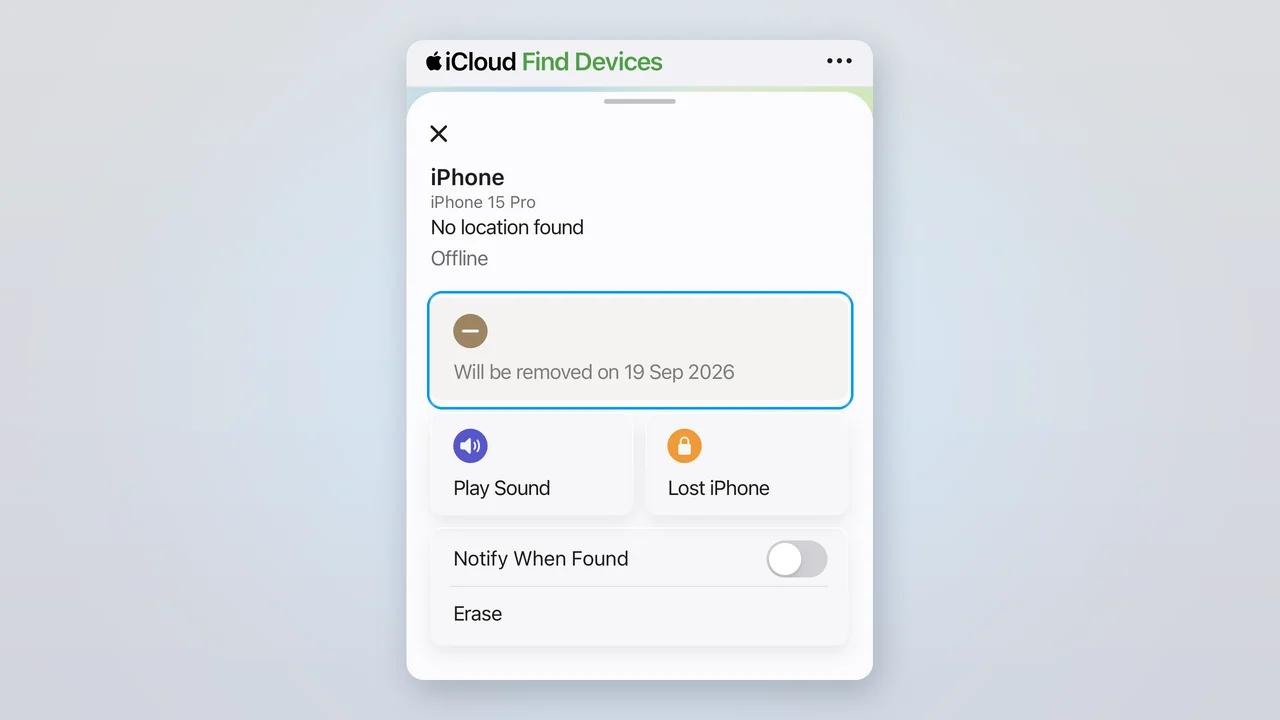
The countdown, highlighted. Note what sits underneath it: Play Sound, Lost iPhone, Notify When Found and Erase are all still live.
Look at the bottom half of that screen, because it is the part that gives the game away. If the phone had genuinely been let go, you would not still be able to ring it, put it into Lost Mode or wipe it from the other side of the country. Those are ownership controls, and they are all still working. The removal has been accepted and queued, not carried out.
Nowhere on that screen does it say whether the phone is still locked. That single missing sentence is the reason this catches people out. You do the right thing, you get a date, and you are left to guess.
How to remove an iPhone from iCloud, step by step
If the phone still switches on, do it in this order and none of the trouble on the rest of this page ever reaches you. It takes about two minutes. Apple’s own reference for the sign-out step is Sign out of iCloud on your devices, checked 25 August 2026.
Back it up first
Settings, tap your name, iCloud, iCloud Backup, or plug it into a computer. Once the next steps are done there is no undo, so do this one first.
Turn Find My off
Settings, tap your name, Find My, then Find My iPhone, and toggle it off. Enter your Apple Account password to confirm. This is the step that actually lifts Activation Lock, and the phone needs to be online for Apple to accept it.
Sign out of your Apple Account
Back in Settings, tap your name, scroll to the bottom and tap Sign Out. If Sign Out is greyed out, that is Screen Time blocking it: go to Settings, Screen Time, Content and Privacy Restrictions, Account Changes, and set it to Allow, then come back and try again.
Now erase it
Settings, General, Transfer or Reset iPhone, Erase All Content and Settings. Doing it in this order matters: erase before you sign out and the phone is wiped but still locked to you.
Check what it boots to
A phone that is properly clear starts up at the language-select or Hello screen. If it asks for an Apple Account, the lock is still on and something above did not take.
Only if the phone will not switch on at all do you fall back to removing it remotely: go to icloud.com/find, sign in, pick the device and choose Remove This Device. That is the route the rest of this page is about, and it is the one that comes with a catch.
Apple’s own two support pages do not agree
We went looking for a straight answer and found two, which is the root of the confusion. Apple publishes separate user guides for iCloud and for iPhone, and on this specific point they say different things.
The iCloud User Guide says
“If the device is offline, Activation Lock is removed immediately, and the device is removed from Find My after 30 days.”
Read plainly: the lock is already off, and only the listing is waiting. Remove a device from Find Devices on iCloud.com, checked 25 August 2026.
The iPhone User Guide says
“The device appears in your Devices list the next time it comes online if it still has Activation Lock turned on.”
Read plainly: removing it and turning the lock off are two different jobs, and the phone may still be locked. Remove a device from Find My on iPhone, checked 25 August 2026.
The same page that gives the second quote opens by describing the two as alternatives: you can use Find My “to remove a device from your Devices list or turn off Activation Lock”. One action, or the other. That is a very different picture from the iCloud guide, where removing is supposed to do both at once.
They also disagree on the timing. The iCloud guide says the phone comes back and re-locks only if it appears online after the 30 days have passed. The iPhone guide has no 30-day qualifier at all: it says the next time it comes online. On the bench, the second version is the one that matches what we see. We cannot tell you what Apple’s activation servers are doing internally, and we are not going to pretend otherwise. What we can tell you is that the documentation genuinely contradicts itself, and that the more pessimistic of the two readings is the one that has been right in front of us.
Erase and Remove are not the same button
Before anything else, this one. It comes up constantly, it costs people real money, and it is the mistake most likely to leave you worse off than if you had done nothing at all.
Erase wipes what is on the handset. Remove takes the handset off your Apple Account. They sit within a couple of taps of each other, they sound like they do the same job, and they absolutely do not.
Apple is unusually blunt about what erasing does not do. On its page covering the Erase option, under the heading “What happens when you erase a device in Find Devices?”, it states: “Activation Lock remains on to protect it. Your Apple Account and password are required to reactivate the device.” Checked 25 August 2026.
That is not a bug, it is the entire point of the feature. Wiping a phone is exactly what somebody who had just stolen it would do. If a wipe cleared the lock, Activation Lock would protect nobody. So Apple made an erase deliberately leave the lock in place.
Which means someone who taps Erase believing they have released their old phone has achieved the precise opposite of what they wanted: a wiped handset that is still tied to them, with the data gone and the lock intact. If you are getting a phone ready to pass on, the order matters more than anything else on this page, and our guide to wiping a phone before selling it walks through it properly.
The way in is the old passcode, not the wait
Here is the part that is buried in Apple’s documentation and missing from nearly every guide that ranks for this question. You do not need the Apple Account password to clear an Activation Lock screen. The phone’s own old passcode works too.
“Remove Activation Lock on the device. Follow the onscreen steps to enter the Apple Account and password you used to set up your device or your device passcode.”
Apple, How to remove Activation Lock, checked 25 August 2026.
In practice that is the difference between a phone you can use this afternoon and a phone you are waiting a month for. Ask most people for their Apple Account password and you get a long pause, a password reset and an authentication code sent to a device they no longer have. Ask them for the six digits they tapped into that phone every day for three years and they tell you immediately.
So if you are sitting in front of a locked phone that is legitimately yours, or you are collecting a repaired phone that belongs to a customer standing next to you, that old passcode is the thing to reach for first. It is the same screen, the same box, and it is the route people do not know exists.
Every other route assumes your phone still works
This is the bit that nobody writes about, and it is the reason the countdown feels so unfair. Apple offers three ways to get a phone off your account. Two of them are clean. Both of those need a handset that switches on, which is precisely what you do not have when the phone is going in for repair.
| Route | What you get | Works on a dead phone? |
|---|---|---|
| Sign out on the phone itself Settings, tap your name, scroll down, Sign Out | Find My and Activation Lock both off, cleanly, straight away | No. Needs a phone that switches on. |
| Erase from Find My, then Remove This Device Erase it remotely first, then remove it once the erase has landed | Lock off and the phone gone from your list, both immediately, no countdown | No. The erase only runs when the phone next comes online. |
| Remove This Device while it is offline Pick it in Find Devices and remove it | You get the countdown, and the phone can still refuse to activate | Yes, and it is the only one left. |
So a broken phone leaves you exactly one option, and it is the one that hands you a date instead of a result. Then the trap closes properly. You need the phone online for Apple to release it cleanly. It cannot get online, because it is broken. You repair it so that it can get online, and switching it on is the very thing that prompts Apple to check the account again. You cannot confirm your own repair without activating the phone, and you cannot activate the phone without clearing the lock.
There is one more wrinkle worth knowing. If the phone is online when you try to remove it, Apple will not remove it at all. It offers to mark it “Ready for Repair or Trade In” for 30 days instead, which is a holding state for a service booking rather than a release.
What is the delay actually protecting?
Activation Lock itself is a genuinely good thing. It made stealing iPhones a far worse business than it used to be, and anyone who has had a phone taken understands instantly why it exists. None of what follows is an argument against the lock.
The countdown is a different question, and we cannot work out what it is for. To reach that screen at all you have already signed in to the Apple Account and passed two-factor authentication. You have proved you are the owner to Apple’s own satisfaction. A thief cannot trigger this, because a thief does not have the password to sign in with in the first place. Apple publishes no explanation for the 30 days that we could find, and the security benefit is not obvious from the outside.
What is clear is that you cannot shorten it. Apple documents no way to bring the date forward, and the people asking on Apple’s own Support Communities are told as much: one owner trying to settle an insurance claim was answered simply with “you won’t be able to do it any quicker”, and a thread asking outright how to bypass the 30-day wait was closed with three people reporting the same problem and no resolution offered.
The people it lands on hardest are the ones behaving properly: the owner who remembered to remove their phone before posting it for repair, the person settling a claim, the seller trying to hand over cleanly. A thief was never going to be inconvenienced by it.
If you have bought an iPhone that says “Locked to Owner”
Different situation, same lock, and a much shorter answer. Apple’s guidance is that on iOS 15 or later a phone protected by Activation Lock shows an “iPhone Locked to Owner” screen when you wake it, and its advice is unambiguous: do not take ownership of any used iPhone that is showing it.
If you already have, the only routes are through the person who sold it to you. They can remove it from their account, or give you the account password or the old device passcode. Apple also runs a support request process for people holding proof of purchase documentation, which is a matter between you and Apple.
What will not work is any of the services and tools that advertise Activation Lock removal or bypass. Search this subject and you will find plenty of them, some ranking on the first page of Google. We are not linking to any, and we would not use one. Apple designed this feature specifically so that it cannot be undone by a third party, which is exactly what makes a stolen iPhone hard to sell, and it is why the feature is worth having.
The real fix is earlier: check before the money moves. A phone that is genuinely clear boots to the language-select or Hello screen, not to a lock screen and not to a request for someone else’s Apple Account. Our checklist for checking a used phone before you buy covers this alongside the blocked-IMEI trap, which catches people out just as often.
What this means if your phone is going in for repair
We should be straight with you about our own part in this, because it is smaller than you might hope. A repair shop cannot do anything about Activation Lock. Not us, not anyone. It sits between Apple and the account holder, by design, and any shop telling you otherwise is either mistaken or selling you something they should not be.
What we can do is tell you what saves everyone the trouble. If your phone still switches on at all, even badly, turn Find My off before you bring it in: Settings, tap your name, Find My, then Find My iPhone, and toggle it off. That takes ten seconds now and removes the entire problem later. If it is already dead, bring the passcode with you instead, because that is what lets the phone be switched on and properly tested once it is fixed.
This matters more than it sounds, because testing is not optional. A screen replacement on iPhone 15 is £105 with us, and we are not willing to hand a phone back on the strength of a display lighting up. Face ID, the cameras, the speakers, the microphones and the mobile signal all need checking on a phone that has actually been through setup. A handset stuck behind an activation screen cannot be checked properly by anybody, which is why we would rather sort this out at the counter than discover it at the end.
And if it turns out the phone was more damaged than it first looked, and you decide it is not worth putting money into, our repair-or-replace guide works through that honestly. Whichever way you go, you will need the lock cleared before it can be sold, traded or passed to anyone else, so it is worth doing while you still have the passcode to hand.
The bottom line
If your iPhone still switches on, sign out of your Apple Account on the phone itself and none of this ever touches you. If it does not, remove it from iCloud by all means, but do not plan around it: expect the phone to stay locked until the date Apple gives you, and expect no way to hurry that along.
The line worth remembering is the one Apple almost hides: at the setup screen, the phone’s old passcode works just as well as the Apple Account password. It is the difference between a phone you can use today and a phone you are waiting a month for, and it is the answer nearly every guide on this subject leaves out.
And be careful which button you press. Erase wipes the phone and leaves the lock exactly where it was. Only Remove, or signing out, actually lets it go. If your phone has gone missing rather than gone wrong, our guide to finding and locking down a lost phone covers the order to do things in, where Activation Lock is working entirely in your favour.
Removing an iPhone from iCloud: your questions answered
Does removing an iPhone from iCloud delete everything?
No. Removing a device and erasing a device are two different things, which is exactly where most people come unstuck. Removing takes the phone off your Apple Account so it stops appearing in Find My. Erasing wipes the content and settings off the handset itself. Removing on its own does not touch what is on the phone, and it does not touch anything stored in your iCloud account either, so your photos, contacts and backups all stay where they are. If you want the data gone from the handset as well as the phone off your account, you need both: erase it, then remove it.
Can you erase an iPhone without signing out of iCloud?
You can, and it is the single most expensive mistake on this whole subject. Apple is explicit about what happens: erasing a device through Find My means "Activation Lock remains on to protect it. Your Apple Account and password are required to reactivate the device." That is deliberate, because an erase is what a thief would do, and letting a wipe unlock a stolen phone would defeat the point of the feature entirely. So erasing without signing out first leaves you with a phone that has been wiped and is still locked to you, which is the worst of both. Sign out first, then erase.
Why can’t I remove my iPhone from iCloud?
If the Remove option is missing or greyed out, the usual reason is that the phone is currently online. Apple only offers the removal on a device that is offline; if it is online and connected, you are offered the option to mark it Ready for Repair or Trade In for 30 days instead. The other common blocker is on the phone itself: if Sign Out is greyed out in Settings, check Settings, Screen Time, Content and Privacy Restrictions, Account Changes, and set it to Allow. Screen Time restrictions quietly block account changes and catch a lot of people out.
Will a factory reset remove the Activation Lock?
Not on its own. A factory reset wipes the content, but Activation Lock lives on Apple’s servers and is tied to the Apple Account the phone is signed in to, not to anything stored on the handset. Reset a phone that is still signed in and it comes back up asking for that same account. The only things that clear it are signing out of the Apple Account before the reset, removing the device from the account afterwards, or entering the Apple Account password or the old device passcode at the setup screen.
How do I remove a previous owner’s Apple ID from a used iPhone?
You cannot, and neither can we or any other repair shop. This is the honest answer and it is worth hearing before you spend money on it. Only the previous owner can release the phone, by removing it from their account, or by giving you their Apple Account password or the device passcode so you can clear it at the setup screen. Apple also runs a support request route for people who hold proof of purchase documentation, which is between you and Apple directly. Anything advertising itself as an Activation Lock bypass or removal service is selling you something Apple has designed to be unsellable. If you are buying second-hand, check the phone before money changes hands rather than afterwards.
How long does it take for Apple to remove Activation Lock?
If you sign out on the phone, or erase it and then remove it, it is immediate. If your only option was to remove an offline phone, Apple shows a date roughly 30 days out and there is no published way to bring it forward. Apple documents no expedite route, and the Apple Support Community threads asking for one are answered with a straight no. In our experience the phone stays locked until that date arrives, so if you need the handset usable before then, the practical answer is not to wait it out but to get in with the Apple Account password or the old device passcode at the setup screen.
Phone dead, and the lock in the way?
We cannot clear an Activation Lock, and nor can anyone but Apple and the account holder. We can fix the phone, for free until you have a written quote and a 12 months warranty on the work, and tell you honestly where you stand.